YarnDraft v0.8.1 BETA
Dialogue2 lines · 2 branches

Speaker YarnDraft

Branching stories
are not documents.
They are graphs.

A desktop workshop for writers and game designers: dialogue trees, quest logic, a story board and level sketches — all in plain files you can open, diff and merge. Free to download.
Instruction

set price = 0

Free to download, free to use, and free of a per-project fee.

Condition

if os == windows

A portable Windows build. Unzip it anywhere and run it — there is no installer.

Output pin

./your-project/

Every project is a folder of small JSON files on your own disk. Nothing is hosted.

The canvas

One infinite canvas. Step into any card.

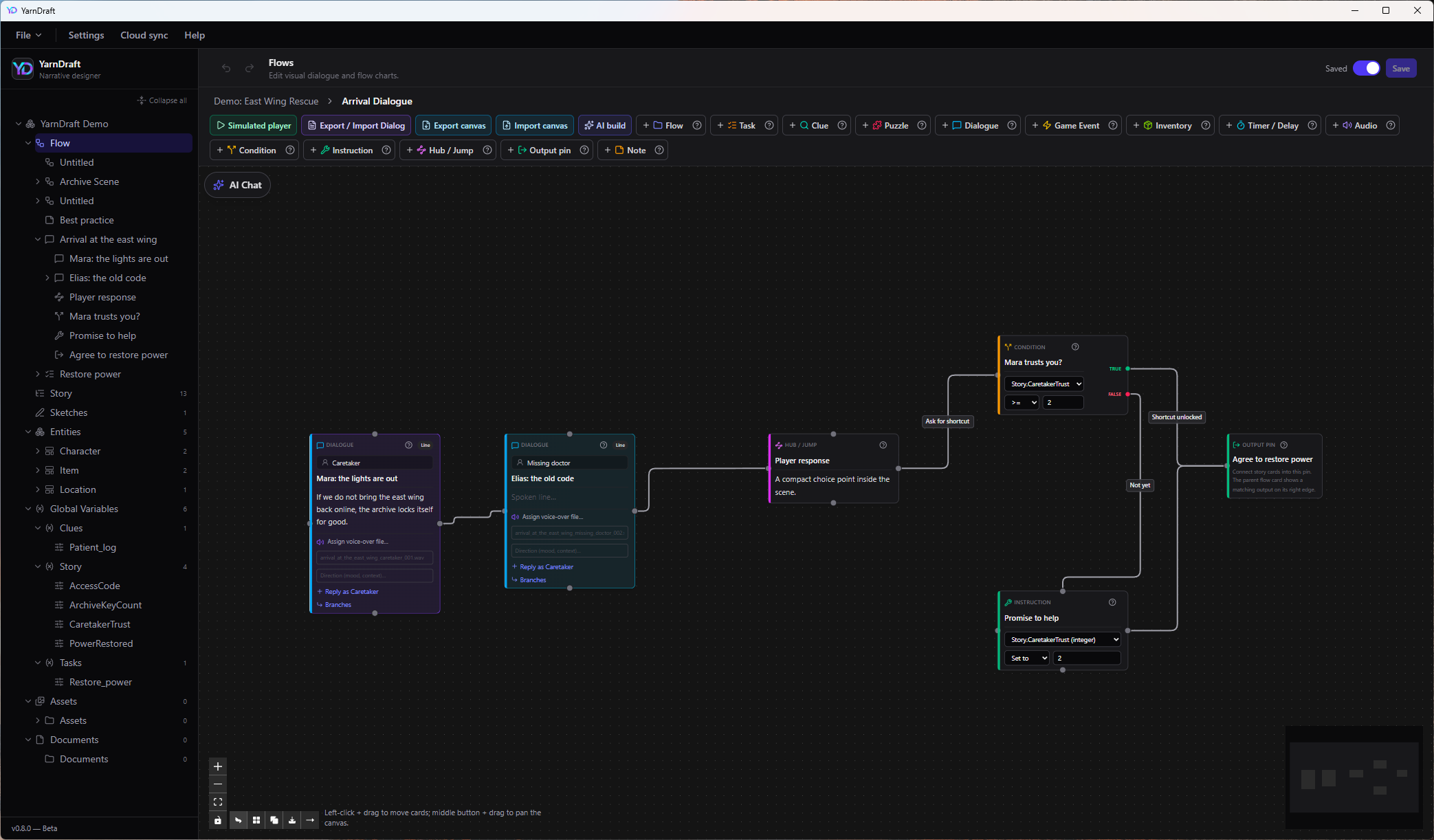
Demo: East Wing Rescue › Arrival Dialogue
The YarnDraft flow canvas: dialogue cards wired into a condition, an instruction and an output pin.
The cards

Twelve kinds of card, and every one of them runs.

Not boxes with text in them. A condition really reads a variable, a puzzle really has three exits, a task really keeps its own state.

Dialogue

A spoken line

Speaker, text, voice-over file, branches.

Condition

A fork in the road

Reads a variable, a task or a clue. True and false leave on their own pins.

Instruction

A consequence

Sets a variable as the player passes through.

Task

A small state machine

Active, done, failed — with its own canvas inside.

Clue

Something learned

A condition can ask for it three scenes later.

Puzzle

Inventory, code or logic

Solved, failed and locked are three separate exits.

Inventory

Give, take, check

The key changes hands on the line where it is said.

Timer / delay

Pressure

Waits — or runs out, which is an exit of its own.

Game event

Over to the engine

Hands your build something to do.

Audio

A cue

Sound or music, attached where it belongs.

Hub / jump

A compact choice

Or a jump to somewhere else entirely.

Flow

A card you step into

The scene lives on its own canvas. Breadcrumbs walk you back out.

+ output pins, and sticky notes for the parts that are still an argument. Every card in the manual →

The board

The same story, seen four ways.

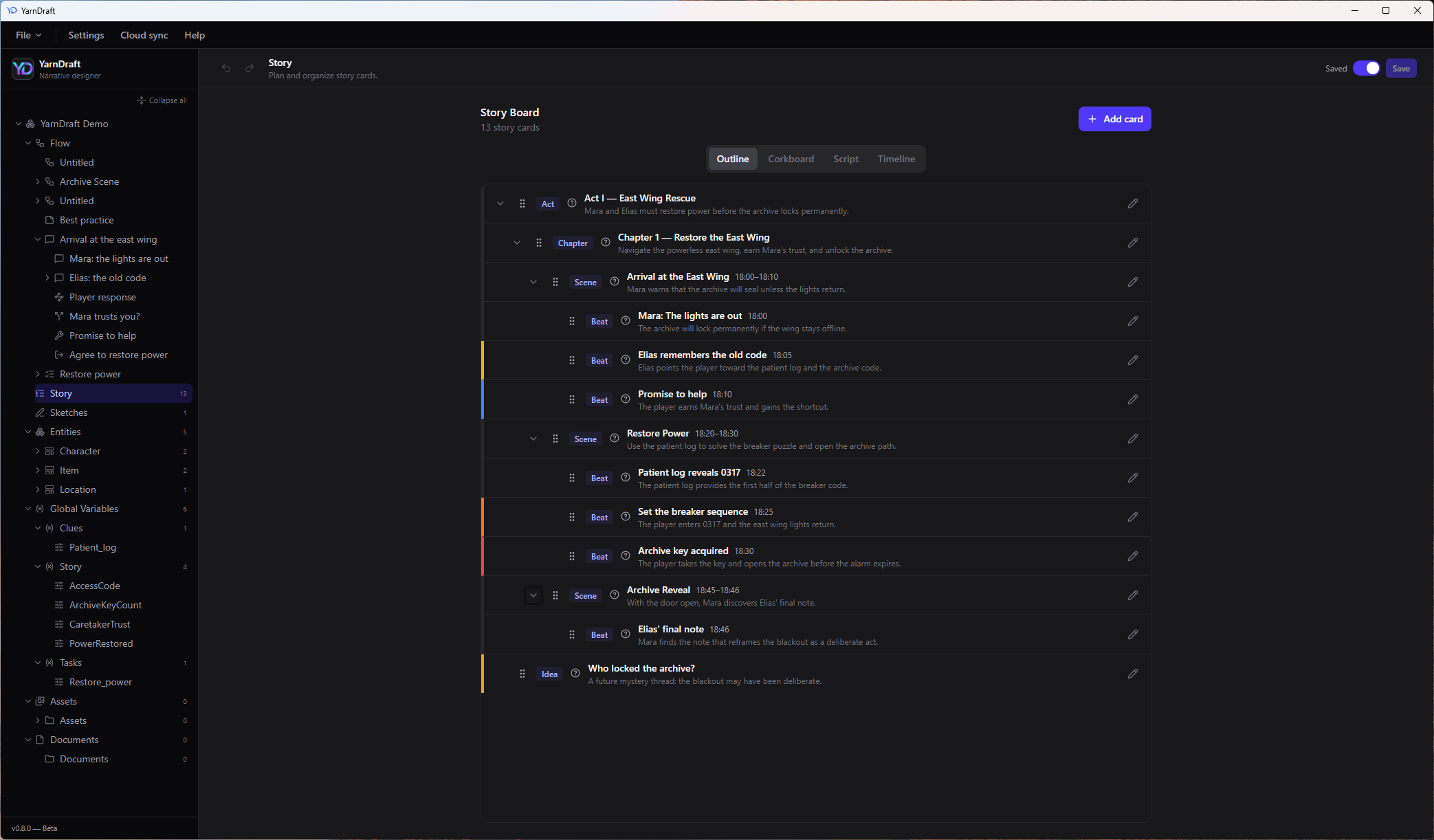
Acts, chapters, scenes and beats on one board. Drag a beat and the outline reorders itself. A card can point at the flow that plays it, or at the sketch of the room it happens in — so the plan and the machine never drift apart.

OutlineCorkboardScriptTimeline

act › chapter › scene › beat › idea

Story Board · 13 story cards
The YarnDraft story board in outline view, with acts, chapters, scenes and beats.
The sketch

Draw the room while you write the scene.

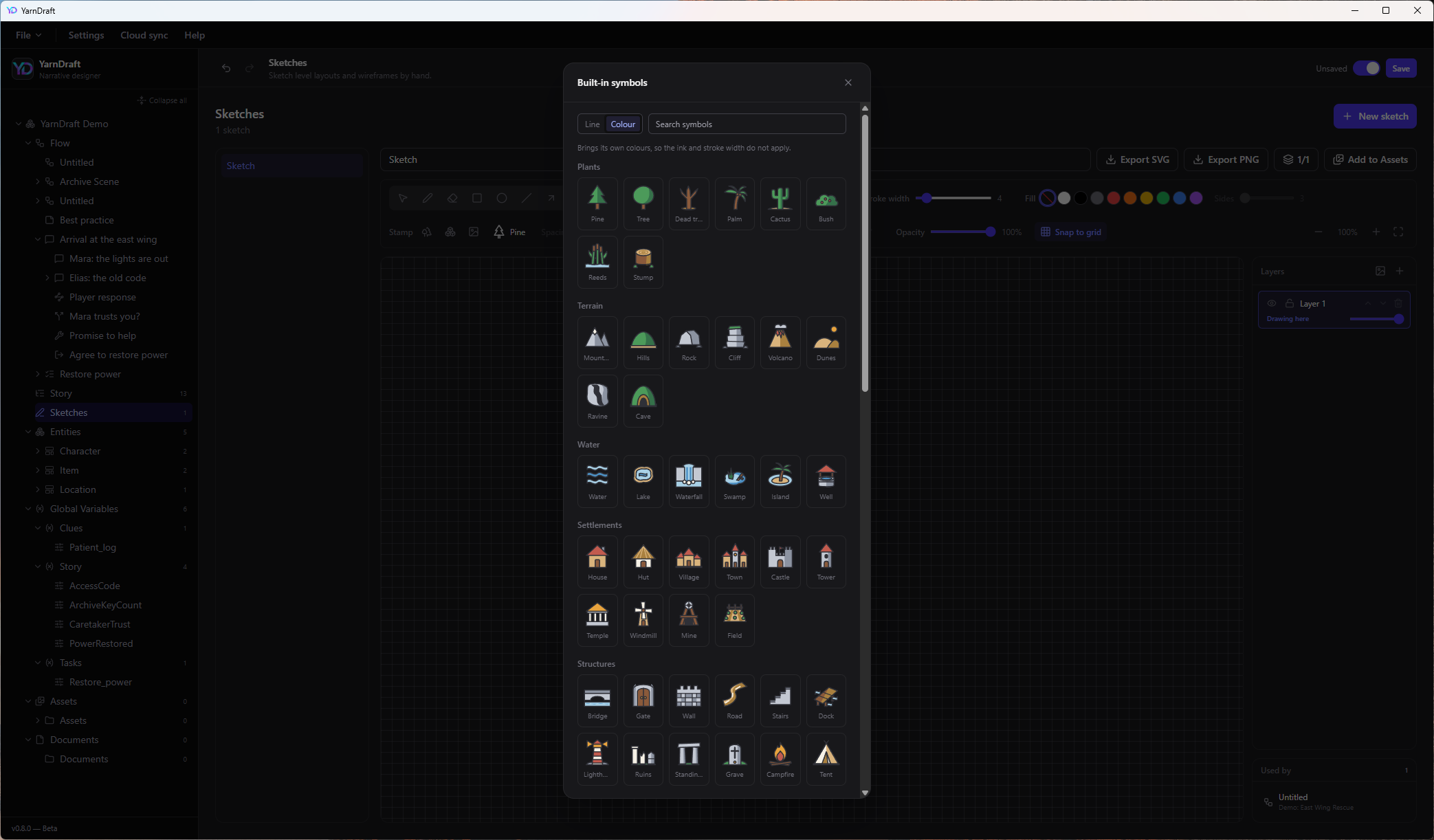
Pen, shapes, layers, grid and angle snapping, and real pressure from a drawing tablet. A hundred and twenty built-in symbols — pines, doors, spawn points, airlocks — in line or in colour. Scatter a row of trees along one drag. Export SVG or PNG, or link the sketch to the card that happens there.

LayersStamp & scatterPressureYour own SVG

one file per sketch · one stroke per line · sketching in the manual →

Sketches · built-in symbols
The sketch view with the built-in symbol palette open: plants, terrain, water, settlements and structures.

./East Wing Rescue/

project.json
variables/story.variables.json
templates/character_template.json
entities/char_mara.json
flows/arrival_dialogue.json
sketches/east_wing.sketch.json
assets/assets.json
@@ flows/arrival_dialogue.json
- "CaretakerTrust": 1
+ "CaretakerTrust": 2
The files

It is a folder, not a database.

One small file per flow, per entity, per variable group, per sketch — written deterministically, so a diff shows what changed and nothing else. Two writers on two branches merge without a fight.

Cloud sync is two buttons: save & upload, download latest. It speaks GitHub, GitLab and the rest, and your writers never see a command line.

It also notices when your project sits in a Dropbox or OneDrive folder,
and warns you before two machines fight over it. Cloud sync →

The assistant

An assistant that has already read the graph.

Optional, and off until you give it a key. Everything else on this page works without it.

AI chatcontext: this flow, 14 cards

Mara agrees too easily. Give her a reason to hold the key back.

She has no stake in the blackout yet. Add a clue about her brother on the night shift, gate the key behind CaretakerTrust ≥ 2, and give the refusal its own line.

proposes 3 cards and 2 edges on the canvas

The floating chat sees the whole graph and runs a structure check before it answers. Ask it to build a stretch of flow and it writes real cards and real edges. Generate characters and items straight from your own templates.

OpenAI Anthropic Google Gemini Ollama · offline

Your key, your model. With Ollama, nothing leaves the machine at all.
AI features →

Out

It leaves as something your engine can play.

Export to Unreal Engine and you get a self-contained plugin — a C++ runtime, a Blueprint player and your whole story as story.json — so the branching runs in-engine instead of sitting there as data you still have to interpret. Dialogue scripts go out as CSV, Markdown or JSON for voice actors and TTS batches, and come back in as a connected chain.

Unreal Engine Unity · coming soon Godot 4 · coming soon

JSON · XML · CSV · Markdown · SVG · PNG · export →

In

Your coding agent can edit the project too.

A bundled MCP server lets Cursor, VS Code or Claude Code open the project the way you do: list the flows, add cards, wire them, write entities and variables, even draw a sketch.

add_dialogue_node · connect_nodes · MCP setup →

Instruction · last card

Free. One less line
in the budget.

Engine, art, audio, the storefront's cut — an indie budget fills up on its own. This is not one of those lines. Download it, point it at a folder, and start writing: no account, no seats, no per-project fee, nothing held back behind a tier.

set price = 0

Download for Windows

v0.8.1 — Beta · portable .zip · 9.3 MB
Windows only for now — macOS and Linux are not packaged yet.

Before the first run

This is a portable package, not an installer. Download the archive, unzip it wherever you like, run the app from there. Nothing is written into Program Files, and uninstalling is deleting the folder.

It is not code-signed yet, so Windows stops the first launch. It is not a virus warning, and it does not come back after the first time.

Windows

SmartScreen shows a blue “Windows protected your PC” panel. Click More info, then Run anyway.

It is still beta, and it says so in the corner of the window. What it already does, it does on your disk, in files you can read.

New to it? The manual starts with a demo project — a small rescue scene, already wired, already sketched.